If you’ve ever gotten a quote for video production, you probably know how quickly the price tag can climb. Custom shoots, location rentals, equipment fees, and editing hours all add up. Thanks to AI tools, a lot of those costs just don’t need to exist anymore. I want to share how AI Studios lets anyone—business owners, content creators, and marketers—start creating high-quality videos without the sticker shock.
Why Traditional Video Production Gets Expensive Fast
Video is everywhere, but making polished videos still feels out of reach for people without big budgets. I’ve worked on both small-business promo shoots and corporate explainer videos, and the costs always come down to a few main factors. Here’s where the money usually goes:
- Talent fees: Hiring actors, presenters, or voiceover artists adds up, especially for recurring or multilingual content.
- Location and equipment: Renting studios, lights, and cameras is pricey—even for short projects.
- Production crew: Directing, filming, audio, and editing involve several skilled people.
- Script changes and reshoots: Simple revisions can mean rebooking everything, costing time and money.
For a basic marketing video, many small businesses get quoted thousands. Even internal training videos often rack up surprising bills. That’s where AI Studios really shakes things up.
Getting to Know AI Studios
AI Studios is by DeepBrain, a leader in AI-powered content tools. It uses realistic AI avatars and advanced text-to-video generation to skip much of the traditional process. I’ve worked with AI Studios for several projects and found it powerful for both budget and creative flexibility. You can try it out here (affiliate link). If you want to get into more detail, I recommend checking out DeepBrain AI: What are the Core Technologies or DeepBrain AI: Your New Partner in Content Creation.
- Type in your script. Literally just copy-paste text & the system does the heavy lifting.
- Choose an AI avatar that fits your brand or message. There are lots of choices, covering multiple ethnicities, languages, and styles.
- Pick your visuals, graphics, and voice. AI handles syncing everything, making a finished video in minutes.
No cameras, no location bookings, and no need for onscreen talent. It’s fast and saves a lot of money, especially for anyone who regularly makes video content.
Comparing Costs: AI Studios vs. Old-School Production
The biggest question I hear is, “How much cheaper is it, really?” Here’s what you need to know.
- Traditional videos often range from $2,000 to $10,000+ per minute for professionally produced content.
- AI Studios videos can be created for a fraction of that, sometimes even under $100 for a full minute, including the avatar and voice work.
Updates are simple, too. Want to change one line in your onboarding video? Just update the text and hit render. No need to rehire anyone or reschedule a shoot. That’s a big deal for businesses making how-tos, explainer videos, or anything that needs regular tweaks.
Features That Make AI Studios Worth Considering
I’ve worked with a few AI video tools, but AI Studios stands out with these features that go a long way toward saving money and hassle:
- Super realistic AI avatars: The digital presenters don’t look like stiff cartoons. They’re smooth and convincing enough for most audiences, even in formal settings.
- Wide range of templates: There are premade themes for training, sales, news, HR, and more. These save time and ensure your video looks pro-level without a designer’s touch.
- Over 80+ languages supported: Need to localize a video for multiple regions? Just switch the language and rerender, no extra voice or talent costs.
- Instant voiceovers: AI voices are much better now, offering natural tones and several accents. There’s also the option to automatically add video subtitles, which is pretty handy.
- Flexible editing: No need for big software downloads. You can make script tweaks on the fly, swap avatars, and try different backgrounds, all from the browser.
If you’re interested in the technical part, you can find out more about how AI Studios works in this article.
Quick Guide: Steps for Making a Video with AI Studios
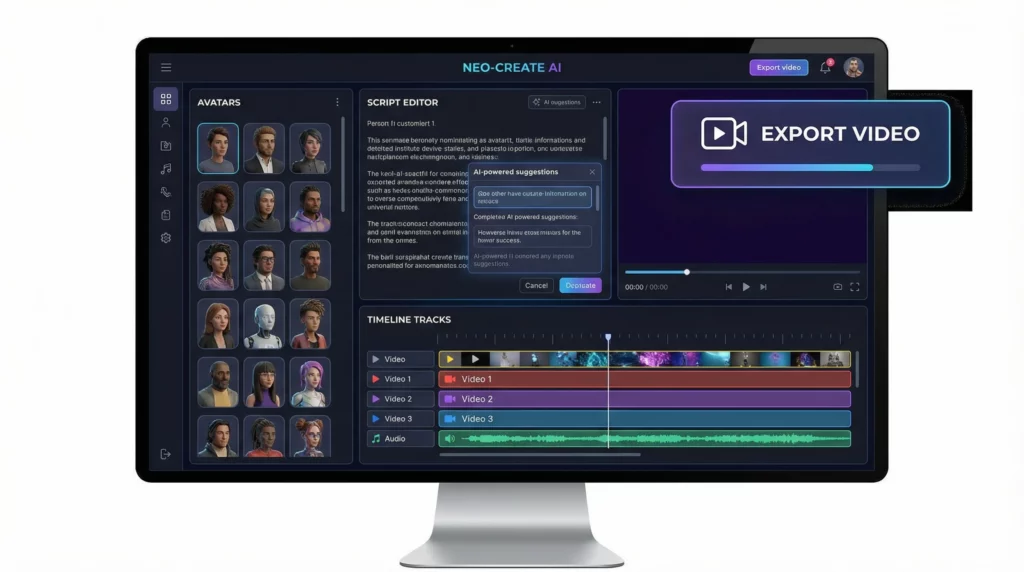
Here’s how I handle a typical AI Studios video for my own business or for a client. The process is much easier than the old-fashioned way:
- Write your script. Start with a clear goal, decide your message, and draft a script. Keep it friendly and concise for the best results.
- Pick an AI avatar. Choose from a big library of presenters; there are formal, casual, and even animated options.
- Select a template or upload your own assets. Use AI Studios designs or bring your slides, logo, and visuals.
- Customize the audio. Select a language and voice for your avatar that fit your brand personality.
- Preview and adjust. Watch the instant preview, check lipsync and visuals, and tweak any text or timing.
- Render and download. Your finished video is ready to share or upload within minutes.
This process can turn around a polished explainer or product demo in a single afternoon, which is almost impossible with a traditional setup. In most cases, after you get used to the workflow, you can crank out several videos in a day or even tackle large projects that would have taken weeks with old-school production. This difference in speed matters for businesses looking to stay ahead in fast-moving markets or update their content without delays.
Things to Think About Before Switching to AI Video
AI Studios lowers costs and is a big timesaver, but I always pay attention to a few important considerations:
- Personal touch: AI avatars are impressive, but they’re not a full replacement for charismatic live personalities in every setting. For emotional ads or high-stakes pitches, traditional video still has the edge.
- Script quality matters: The AI voice and avatar mean your script is front and center. Well-written, concise, and engaging scripts are super important in grabbing viewers.
- Brand consistency: Ensure the avatars and templates you choose align with your brand style, tone, and values.
- Reasonable expectations: AI Studios excels with short-form educational, corporate, or product content. Big creative stories might be better with custom production.
- Data privacy: Any time you use cloud-based tools, double-check privacy settings and content ownership policies.
I encourage business owners to try AI Studios for training materials, FAQ videos, product introductions, and social posts before committing to an expensive shoot. Start small by transforming a PowerPoint presentation or a basic FAQ, and check how your audience responds. Gradually, you can build a library of videos that support your brand’s messaging and reduce repetitive tasks.
Advanced Tips to Get More Value from AI Studios
With a bit of a game plan, you can really maximize the savings and efficiency of AI Studios. Here’s what’s worked best for my clients:
Batch Your Content: Instead of making one-off videos, plan and write scripts for an entire series, such as an onboarding series, weekly tips, or social media explainers. Render them in batches to save time and create a cohesive look for your channel.
Repurpose Written Content: Turn blog posts, FAQs, newsletters, or even old presentations into video scripts. Recycling evergreen content keeps your investment working longer, and AI Studios makes that process easy.
Experiment with Different Avatars: Try out a few presenter styles to see which clicks best with your audience. You might use a formal avatar for policies and a friendly one for welcome or sales content.
Use Multilingual Capabilities: Reaching international markets gets much easier. Render your video in multiple languages from a single script and asset file; there is no need for additional translation or voice actors.
A solid AI Studios workflow helps you stay nimble and keep up with the demand for fresh content, especially if you’re working in B2B or content marketing. You can read more about smart B2B marketing in this guide. Another creative tip is to split longer training into shorter segments to make the content digestible. Not only does this approach save on production costs, but it also helps with audience retention and learning.
Types of Projects That Benefit Most from AI Video Production
Based on my own use and feedback from other creators, here are the project types that get the most out of the AI Studios approach:
- Internal training or onboarding: Quick to update and super cost-effective for large teams. You can create welcome tours, explain new policies, or walk staff through tools and processes, all with minimal effort.
- Product explainers and demos: Fast turnarounds help businesses keep up with feature launches and product updates. Launch new features or highlight changes with videos that match your brand style.
- Customer FAQs: Answer common questions with simple videos to make customer support easier and add a friendly touch. Reduce repetitive inquiries by showing clear, visual answers that customers can access anytime.
- Company announcements: Share HR updates, policy changes, or welcome new hires without booking video shoots. Keep your organization informed with news presented clearly and consistently.
- Educational microlearning: Perfect for short, focused lessons or daily tips that used to require lots of time to shoot and edit. Teachers, coaches, and trainers can share knowledge in engaging formats without technical headaches.
I’ve seen schools, startups, and even big corporations turn massive training manuals or onboarding decks into bite-sized, far more engaging videos in days, not weeks or months. That’s a huge productivity gain, allowing teams to focus on their core roles rather than reinventing the wheel for each update. Plus, with multilingual support, you can reach audiences that were previously hard to serve due to language barriers.
Frequently Asked Questions
Here’s what I get asked the most about AI Studios and slashing video costs:
Can AI Studios make videos for any industry or niche?
Yes! I’ve made content for tech, healthcare, ecommerce, education, and more using AI avatars and templates tailored to each audience. The flexibility is pretty surprising. Need a polished training video for nurses, a walk-through for an app, or a new employee onboarding? It’s all doable without hiring a full crew.
Do the videos look professional enough for clients or upper management?
When you choose the right templates and avatars, the videos are polished and clear. For most internal, training, or B2B projects, they’re a big upgrade from old slideshows or webcam clips. For high-stakes advertising, you may still want the extra flair of custom shoots, but for ongoing education and updates, AI Studios holds up well.
Is there a learning curve to using AI Studios?
It’s much easier than most video editing software I’ve used. After your first couple of tries, you’ll get the hang of writing scripts and customizing avatars. The workflow is super userfriendly and everything happens right in your browser, removing the need for heavy editing software installs.
How does AI Studios handle script updates or last-minute changes?
This is where it really shines. Just edit the script, choose the avatar and voice, and rerender. There’s no waiting for reshoots or booking new voice actors. Updates go live fast and don’t break the bank, which is ideal for businesses that need to keep content current.
Are there any hidden costs?
AI Studios is transparent about pricing. Just keep an eye on project count or advanced features, which might be limited on some plans. But compared to traditional video bills, the savings are easy to spot. It helps to review your plan options before a big rollout so you have the access you need.
Wrapping Up: Slashing Video Costs Without Sacrificing Quality
Video doesn’t have to break your marketing budget anymore. Tools like AI Studios lower costs and make production smoother, even for those of us who aren’t filmmakers. These AI-powered workflows let you focus on message and reach, not logistics.
I recommend trying AI Studios (here’s the official site) if you’re tired of overpaying for business video, want reliable updates, and need to deliver more content, faster. For more tips and tools on using AI in content creation, explore other guides at NicheMarketingIdea.com. Jump in, try creating a few videos, and see how far your budget can go when you rethink the old rules of production.
Disclosure
