Learn how DeepBrain AI Studios lets you create professional videos without filming. See features, use cases, comparisons, pricing context, and whether it’s worth it.
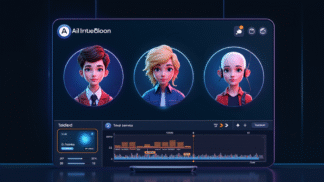
Can you really create videos without filming yourself?
Yes. AI video generators like DeepBrain AI Studios allow you to create professional presenter-style videos using text alone. You write a script, select an AI avatar, and generate a finished video without a camera, microphone, or editing software.
This pillar guide explains how DeepBrain AI Studios works, who it’s for, how it compares to other AI video tools, and when it makes sense to use it as part of a scalable content strategy.
Create videos without a camera using DeepBrain AI Studios
Turn a script into a presenter-style video in minutes. Great for explainers, training, and faceless marketing videos.
Disclosure: If you sign up through this link, I may earn a commission at no extra cost to you.
What is DeepBrain AI Studios?
DeepBrain AI Studios is an AI-powered video creation platform that converts written scripts into realistic, human-style video presentations. Instead of recording yourself, the platform uses licensed AI avatars that speak your text with natural lip-sync and gestures.
It is designed primarily for business, education, and marketing, not entertainment or cinematic storytelling.
Common use cases include:
- Explainer and product videos
- Affiliate and review videos
- Training and onboarding content
- Sales presentations
- Faceless YouTube channels
The core value proposition is speed, consistency, and repeatability.
How DeepBrain AI Studios works (step-by-step)
The workflow is intentionally simple:
- Create or paste your script
This can come from a blog post, landing page, or outline. - Choose an AI avatar and voice
Avatars are professional and neutral, designed for trust-based content. - Add visual elements if needed
Slides, captions, and basic layouts are optional. - Generate and export your video
Rendering happens automatically. No editing timeline required.
This structure makes it especially useful for marketers who publish frequently.
Who DeepBrain AI Studios is best for
DeepBrain AI Studios is not for everyone. It performs best in system-driven workflows.
Ideal users
- Affiliate marketers creating explainer or comparison videos
- Bloggers repurposing written content into video
- Coaches and educators producing consistent lessons
- Agencies creating client videos at scale
Not ideal for
- Personality-based vloggers
- Creators who rely on emotional, face-to-camera storytelling
- Projects requiring cinematic visuals or advanced animation
If your goal is clarity and volume, not personal branding, the platform fits well.
DeepBrain AI Studios vs other AI video tools
Below is a fact-safe comparison based on positioning and typical use cases, not subjective quality claims.
AI Video Platform Comparison Table
| Feature / Focus | DeepBrain AI Studios | Synthesia | Pictory | HeyGen |
|---|---|---|---|---|
| Primary use case | Business & education videos | Corporate training | Text-to-video summaries | Marketing & social videos |
| Avatar style | Professional, presenter-style | Corporate presenters | Limited avatar focus | More expressive avatars |
| Script-based creation | Yes | Yes | Yes | Yes |
| Faceless video friendly | Yes | Yes | Partial | Yes |
| Editing complexity | Low | Low | Low | Low |
| Best for scale | Yes | Yes | Moderate | Moderate |
Key takeaway:
DeepBrain AI Studios emphasizes professional delivery and clarity, not flashy visuals or entertainment-style avatars.
For a broader breakdown, see
AI video tools for marketers
(Internal link: nichemarketingidea.com)
How DeepBrain compares to traditional video creation
AI video vs filming yourself
| Factor | Traditional Filming | DeepBrain AI Studios |
|---|---|---|
| Camera & lighting | Required | Not required |
| Retakes | Frequent | None |
| Editing time | High | Minimal |
| Consistency | Variable | High |
| Scalability | Limited | Strong |
AI video tools don’t replace all video formats, but they remove friction where speed and consistency matter most.
Is DeepBrain AI Studios ethical and safe to use?
DeepBrain positions its platform for legitimate commercial and educational use. Avatars are licensed, and the tool is not intended for impersonation or deception.
Responsible usage includes:
- Treating AI presenters as representations, not real people
- Avoiding claims that suggest a real human spokesperson
- Disclosing AI use when appropriate
When used transparently, AI video creation supports accessibility and efficiency without misleading audiences.
Pricing overview (fact-safe)
DeepBrain AI Studios pricing varies by:
- Usage limits
- Video length
- Feature access
Because pricing and plans can change, the most accurate information is always on the official site.
You can review current plans here:
Explore DeepBrain AI Studios (affiliate link):
https://www.deepbrain.io/aistudios?via=kevin-meyer
Affiliate disclosure: I may earn a commission if you sign up through this link, at no additional cost to you. Recommendations are based on practical marketing use cases.
Is DeepBrain AI Studios worth it?
DeepBrain AI Studios is worth considering if:
- You want video content without being on camera
- You publish content consistently
- You value repeatable systems over personal branding
It is not a universal video replacement, but it works well inside content engines, especially for affiliate marketing, SEO-driven publishing, and educational workflows.
How DeepBrain fits into a scalable content system
Many marketers use DeepBrain AI Studios as part of a larger strategy:
- Blog post → AI video
- Landing page → sales explainer
- Product review → faceless YouTube video
This approach aligns well with:
- Faceless content strategies
- AI-powered content repurposing
- Affiliate marketing systems that scale
(All internal links ready for nichemarketingidea.com)
Final verdict
DeepBrain AI Studios solves a specific problem: creating professional videos without filming. If that problem exists in your workflow, it’s a strong tool to evaluate.
For creators focused on efficiency, consistency, and scale, AI video platforms like this are no longer optional. They’re infrastructure.
Ready to publish videos without filming?
Use DeepBrain AI Studios to generate professional presenter videos from text, without a camera or editing timeline.
Disclosure: I may earn a commission if you purchase through this link, at no additional cost to you.
