If you’re considering AI Studios for creating videos with artificial intelligence, you probably want a super detailed breakdown of what you’re really getting for your money. AI video tools have been popping up everywhere, making it trickier to know which ones deserve your time, energy, and budget. I’ve spent plenty of time in the AI video space, testing out programs, comparing features, and occasionally losing hours to tools that just didn’t deliver. Here’s my experience-based look at AI Studios, how it prices its services, its main features, user experience, and a real-world verdict on whether it’s a smart pick for creative projects, marketing, or business needs.
What Is AI Studios?
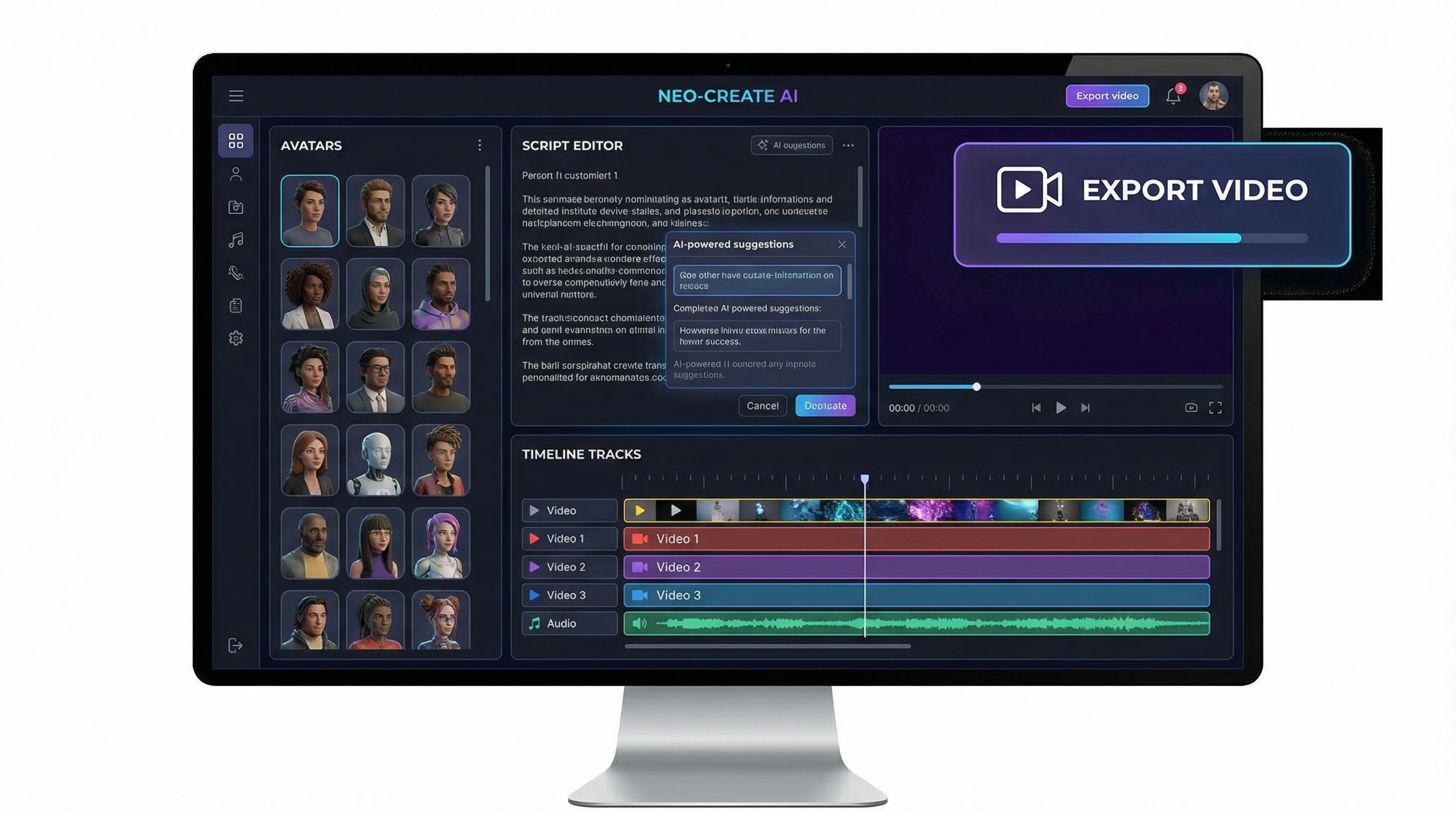
AI Studios is a web-based platform from DeepBrain that lets you generate talking avatar videos with just text input. There’s no need for a camera, microphone, or on-screen talent. If you want to create training content, quick marketing explainers, internal briefings, or customer service explainers, it’s built to help you pump out polished videos quickly, with digital avatars delivering your message. Everything works in your browser, so you don’t need video editing or design skills to make it come together.
It’s a smart fit for people who feel a bit camera-shy, don’t want to hire actors, or need to crank out lots of training or marketing content quickly. I stumbled upon AI Studios while searching for a way to speed up routine explainer videos, hoping to avoid endless retakes and time-consuming lighting setups. From onboarding guides to YouTube explainers and everything in between, AI Studios aims to cover a wide range of needs with digital presenters that sound remarkably lifelike.
How Does AI Studios Work?
Video creation with AI Studios follows a straightforward workflow:
- Pick a Template or Start from Scratch: Choose from predesigned layouts, or build your own scenes step by step.
- Choose Your AI Avatar: Select from a wide range of photorealistic and cartoon-style avatars in different looks and accents.
- Type Your Script: Paste your text or type scripts for each scene, and your selected avatar will present the lines using text-to-speech.
- Adjust Settings: Tweak voice tones, avatar positioning, backgrounds, and even add music or subtitles.
- Preview and Export: Get a rapid preview, then export the video for download or easy sharing.
This workflow is easy to manage. If you don’t want to fuss with complicated multi-layer video timelines or advanced effects, you’ll probably appreciate the streamlined process. Personally, it has been super useful for batch-creating training modules—writing several scripts, assigning different avatars, and exporting multiple videos in under an hour saves loads of time.
AI Studios Pricing: What Do You Get at Each Tier?
AI Studios offers different subscription levels based on how many video minutes you need, which features matter most to you, and whether you’re working solo or with a team. Here’s what you get in each common package (keep in mind, actual pricing sometimes changes, so always double-check the official AI Studios page for the latest offers):
- Starter Plan: Built for solo creators, this plan gives you a fixed number of video minutes each month, access to a big chunk of the avatar library, and some basic customization tools. There are limits to video exports and maximum resolution.
- Pro Plan: Aimed at small businesses or freelancers who generate videos regularly. You get higher monthly video limits, quicker rendering speeds, and added features like premium avatars and more voice options.
- Enterprise/Business Plan: Tailored for companies and larger teams. This plan offers features such as custom avatar creation, group collaboration tools, priority support, and a massive monthly video allowance. Pricing is usually custom after a chat with their team.
If you just want to check it out, there’s a free trial with watermarked videos. That’s great for testing the platform before opening your wallet.
From a budget standpoint, AI Studios isn’t the cheapest tool, but it does save you massive amounts of time if you need to regularly make explainer or educational videos. Ultimately, the investment makes sense if you need plenty of videos each month and want them to look highly polished.
Main Features in AI Studios
AI Studios is packed with tools that make video creation easier. Here are the most important features—plus places where there could be a little more polish:
- AI Avatars: Pick from a wide variety of realistic humans and cartoon avatars, with diverse genders, ethnicities, and regional accents. Their lip sync and audio realism are better than you’ll find in most low-budget alternatives.
- Multilingual Text-to-Speech: Supports a large number of languages and accents, so you can make global content without extra translation steps.
- Custom Branding: Easily drop in logos, play with brand colors, pick backgrounds, and style layouts to keep everything on-brand.
- Templates and Scene Builder: Use ready-made video templates for onboarding, explainers, business pitches, and more. These prebuilt templates help create pro-style content quickly when you’re in a pinch.
- Subtitle Generator: Subtitles are generated automatically, making your content more accessible and easier to use for mute or silent play in feeds.
- Custom AI Avatar Creation (Enterprise): If the default collection isn’t enough, Enterprise users can work with AI Studios staff to craft avatars based on real team members or brand mascots—perfect for unique branding.
- Integration with PowerPoint and Other Tools: Import PowerPoint decks directly and embed an avatar to present each slide, turning static presentations into lively lessons or explainer videos.
Compared to other AI video tools, the sheer variety of avatars and language options sets AI Studios apart. Its interface is welcoming, has a low learning curve, and, since it’s all web-based, works on nearly any computer or device.
Who Should Use AI Studios?
AI Studios is a great fit for:
- Small and medium businesses that need to train teams or onboard clients frequently.
- Solo creators, YouTubers, and freelancers who want to keep their video content flowing without hiring talent or voice actors.
- Marketing and social media managers who need to ramp up the number of branded posts, short ads, or quick walk-through content for their audiences.
- HR groups or training teams with a regular schedule of instructional, compliance, or onboarding videos that are frequently updated.
Personal story: I helped a client shift their classroom training program online by creating custom avatar-led training videos, replacing the need for constant reshoots and script updates. While nothing really matches the warmth of live action, for informational videos and high-volume content, digital avatars make production smoother and more affordable.
Where AI Studios Shines and Where It Can Improve
From lots of hands-on use, here’s where AI Studios really makes a splash, and a few places it could give a boost:
- Where It Excels:
-
- Speedy, repeatable video generation for HR, customer support, or internal knowledge bases.
- Multi-language video rollouts. Translating and recording in several languages is much faster here than with normal production cycles.
- Test-driving training modules or concepts without huge upfront production costs.
- Where It Could Step Up:
-
- Even with the eye-catching avatars, you can’t quite mistake them for live presenters. Occasionally, lip sync varies depending on the script.
- Lower plans top out with some video watermarks and resolution caps, which isn’t ideal for organizations that need public-facing, high-quality exports.
- Advanced animation or cinematic editing options are pretty limited. If you want fine-grained transition controls or multi-layer effects, you’ll miss the extra bells and whistles from big-league editors.
How Does AI Studios Stack Up Against Other Video AI Tools?
There are a bunch of AI video makers to consider—Synthesia, Colossyan, and HeyGen, for instance. Here’s a quick head-to-head view based on my own projects:
- Avatar Selection: AI Studios has one of the deepest libraries out there, plus custom avatar development for company branding on its top tier.
- Language Coverage: Supports a wide mix of languages, saving you the step of outside translation or third-party plugins.
- User Experience: Its interface is friendly and simple—ideal if you want a tool that gets out of your way.
- PowerPoint Integration: Native deck imports let corporate users quickly turn dusty presentations into punchy videos.
- Cost: The basic paid plans are a bit higher than some competitors’, but if you have steady demand or heavy training needs, the productivity benefits often make up for it.
Potential Challenges and Extra Costs to Remember
While AI Studios is loaded with perks, there are a few important caveats:
- Video Minute Caps: Plans come with hard limits. If you suddenly need tons of new videos, you’ll tear through your monthly quota in a hurry. Buying add-on minutes can get expensive if you don’t plan ahead.
- Branding Features: Starter plans only let you do a little with branding. For full brand customization, you’ll want the Pro or Enterprise levels.
- Learning Window: Most folks will pick up AI Studios in minutes, but learning how to combine languages, perfect subtitle displays, and add just the right background music might take a short stretch of experimentation.
Also, keep in mind that subscriptions typically auto-renew, and cancellations can take a bit of time. Make sure you check in with their support to avoid accidental charges.
My Personal Tips for Getting the Most Out of AI Studios
- Write scripts as if you’re reading off teleprompters—short, crisp lines deliver best. You’ll spot mistakes faster, and the avatars present more naturally.
- Preview all the voice options before settling on your final pick. Some voices match certain personalities or emotions much better.
- Batch your video making. Writing and uploading several scripts at once, then rendering multiple videos in a block, always saves time.
- Use the PowerPoint import feature if you’ve got old presentations lying around; it’s a quick way to get digital presenters for them.
- Remember to back up every video export. Plan upgrades and downgrades change your access to certain avatars and export resolutions.
If you’re brand new to AI-driven video tools, AI Studios makes it easy to get involved and still has enough tools and flexibility for routine, heavy-duty content work.
AI Studios FAQ
What kinds of videos can you produce with AI Studios?
You can build explainers, educational modules, YouTube intros, customer walkthroughs, HR briefings, and much more. If it can be scripted, you can likely turn it into a video with an AI avatar.
How fast can I make a video?
Simple videos get finished in minutes. If you’re doing long, multi-scene, or multi-language projects, it takes more time—but it’s still way faster than recording and editing everything live.
Can I use these for YouTube or socials?
Definitely. Just be sure you’re on a paid plan that produces watermark-free exports at the best resolution for your channel.
Is my work private?
AI Studios marks all projects private by default. Business and Enterprise users can talk to the team for extra privacy features and controls if needed.
What does custom avatar creation cost?
This depends on how many avatars you want and your use case. It’s best to reach out to DeepBrain’s team via their website to get a tailored quote.
Wrapping Up: Should You Try AI Studios?
If you’re a creator, coach, marketer, or anyone who delivers regular video messaging, AI Studios deserves a look. Its workflow, variety of presenters, and language talent make it stand out for business or high-volume creative work. The easy drag-and-drop tools and absence of complicated settings let just about anyone get started smoothly.
If you only need a video every blue moon, the price tag might feel hefty. If video content is a big part of your job, or you manage lots of education or branded guides, it quickly earns its keep with time savings and pro results. I recommend running through the free trial, using my affiliate link here: https://www.deepbrain.io/aistudios?via=kevin-meyer. Test-drive exports, see how the avatars land with your viewers, and tally up how much manual work you’ll cut out versus normal shooting and editing. That’s always been my best gauge—the time saved creating loads of clean, consistent videos at speed.
